Orchestrate downstream exposures Beta
Use dbt platform job scheduler to proactively refresh downstream exposures and the underlying data sources (extracts) that power your Tableau Workbooks.
(Applies to dbt v2.0 and later)Orchestrating downstream exposures isn’t available when your deployments use Fusion Stable. Supported jobs must use Latest with the dbt Core engine.
On the Fusion Stable release track (the dbt Fusion engine preview), orchestrating downstream exposures isn’t supported yet. Setting DBT_ACTIVE_EXPOSURES and DBT_ACTIVE_EXPOSURES_BUILD_AFTER won’t enable orchestration behavior (like Tableau extract refreshes) or the related job log entries.
The private beta is for dbt Enterprise accounts. Contact your account representative for access.
Orchestrating exposures integrates with downstream exposures and uses your dbt build job to ensure that Tableau extracts are updated regularly.
Control the frequency of these refreshes by configuring environment variables in your dbt environment.
Prerequisites
To orchestrate downstream exposures, you should meet the following:
- Configured downstream exposures and ensured desired exposures are included in your lineage.
- Verified your environment and jobs are on a supported dbt release track.
- Have a dbt account on the Enterprise or Enterprise+ plan.
- Created a production deployment environment for each project you want to explore, with at least one successful job run.
- Have admin permissions in dbt to edit project settings or production environment settings.
- Configured a Tableau personal access token (PAT) whose creator has privileges to view and refresh the data sources used by your exposures. The PAT inherits the permissions of its creator. Use a PAT created by:
- A Tableau server or site administrator
- A data source owner or a project leader
Orchestrate downstream exposures
To orchestrate downstream exposures and see refreshes happen automatically during scheduled jobs on Latest with the dbt Core engine:
- In the dbt platform, click Deploy, then Environments, and select the Environment variables tab.
- Click Add variable and set the environment level variable
DBT_ACTIVE_EXPOSURESto1within the environment you want the refresh to happen. - Then set the
DBT_ACTIVE_EXPOSURES_BUILD_AFTERto control the maximum refresh frequency (in minutes) you want between each exposure refresh. - Set the variable to 1440 minutes (24 hours) by default. This means that downstream exposures won’t refresh Tableau extracts more often than this set interval, even if the related models run more frequently.
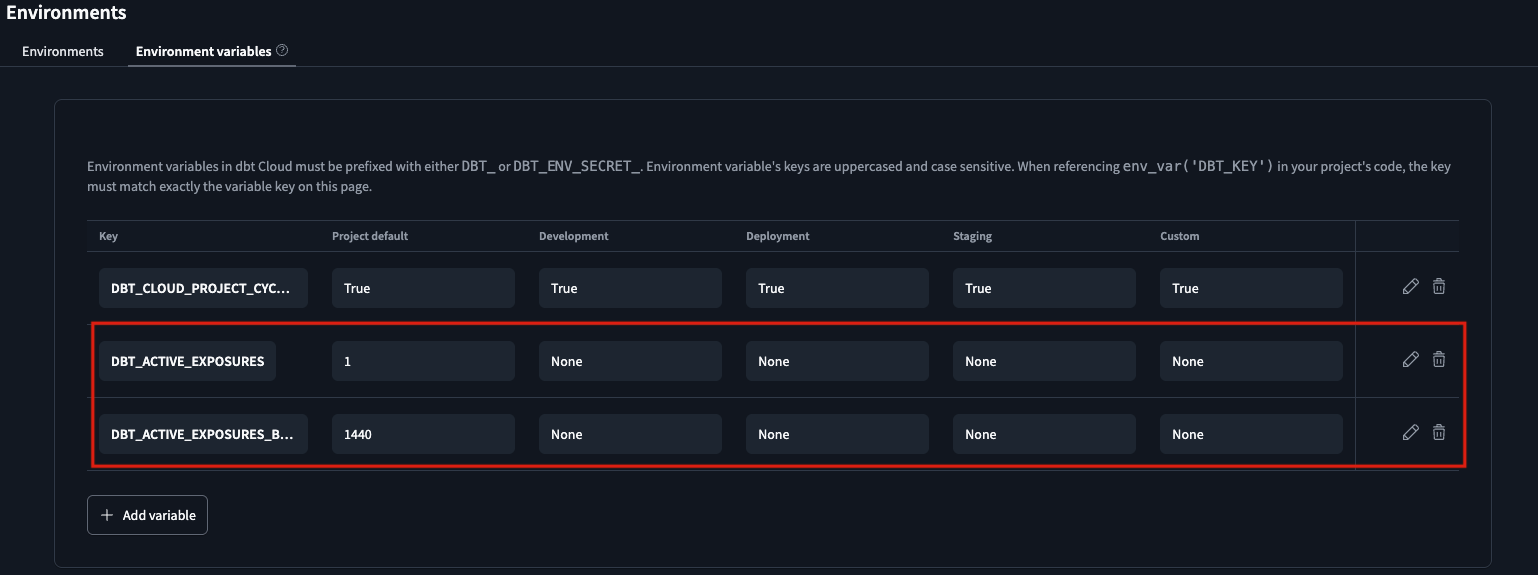 Set the environment variable `DBT_ACTIVE_EXPOSURES` to `1`.
 - Run a production job on Latest with dbt Core. Each run can trigger a downstream exposure refresh; if a job runs before the configured interval has passed, dbt skips the downstream exposure refresh and marks it as
skippedin the job logs. - View downstream exposure entries in your run job logs.
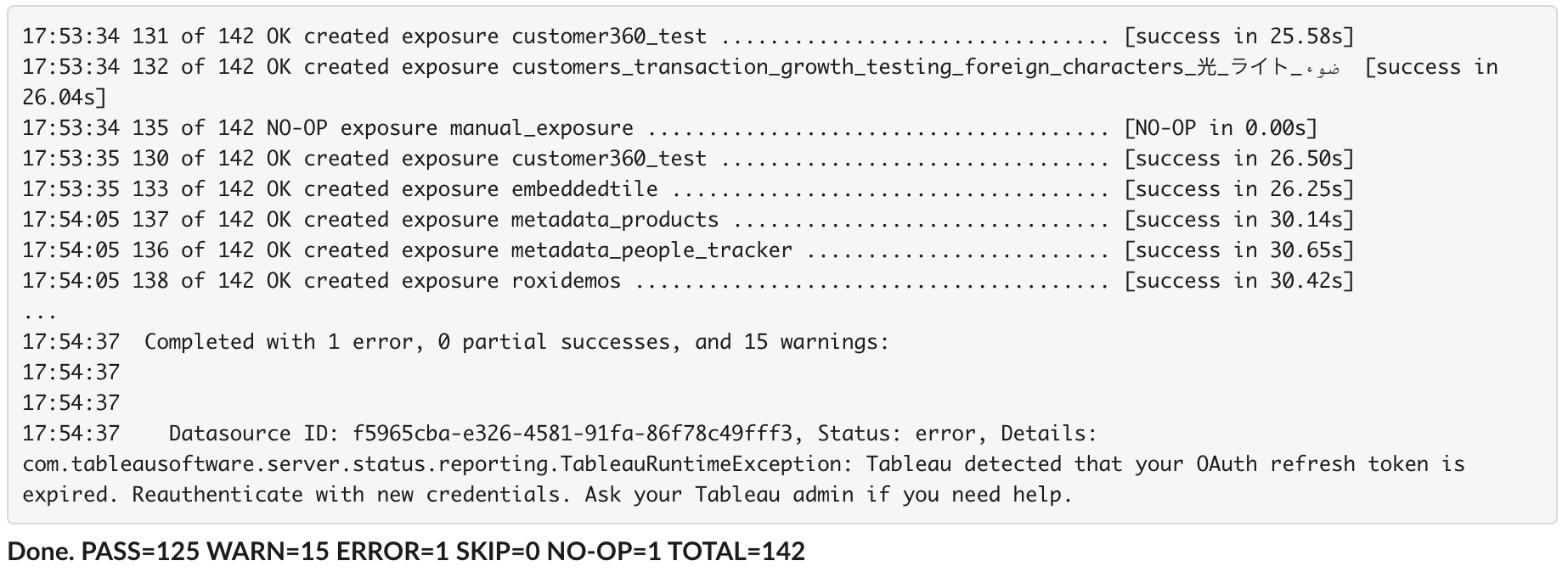 View the downstream exposure logs in the dbt run job logs.
- View more details in the debug logs for any troubleshooting.
Was this page helpful?
This site is protected by reCAPTCHA and the Google Privacy Policy and Terms of Service apply.