Access, Regions, & IP addresses
dbt is hosted in multiple regions across the following service providers:
Your dbt account will always connect to your data platform or git provider from the below IP addresses. Be sure to allow traffic from these IPs in your firewall, and include them in any database grants.
- dbt Enterprise-tier plans can choose to have their account hosted in any of the regions listed in the following table.
- Organizations must choose a single region per dbt account. To run dbt in multiple regions, we recommend using multiple dbt accounts.
Amazon Web Services (AWS)
| Region | Location | Access URL | IP addresses | Available plans | Status page link |
|---|---|---|---|---|---|
| North America | AWS us-east-1 (N. Virginia) | ACCOUNT_PREFIX.us1.dbt.com | 52.45.144.63 54.81.134.249 52.22.161.231 52.3.77.232 3.214.191.130 34.233.79.135 | All dbt platform plans | Multi-tenant: US AWS Cell based: US Cell 1 AWS US Cell 2 AWS US Cell 3 AWS US Cell 4 AWS |
| EMEA | eu-central-1 (Frankfurt) | ACCOUNT_PREFIX.eu1.dbt.com | 3.123.45.39 3.126.140.248 3.72.153.148 | All Enterprise plans | EMEA AWS |
| APAC | ap-southeast-2 (Sydney) | ACCOUNT_PREFIX.au1.dbt.com | 52.65.89.235 3.106.40.33 13.239.155.206 | All Enterprise plans | APAC AWS |
| Japan | ap-northeast-1 (Tokyo) | ACCOUNT_PREFIX.jp1.dbt.com | 35.76.76.152 54.238.211.79 13.115.236.233 | All Enterprise plans | JP Cell 1 AWS |
| Virtual Private dbt or Single tenant | Customized | Customized | Ask Support for your IPs | All Enterprise plans | Customized |
Google Cloud Platform (GCP)
| Region | Location | Access URL | IP addresses | Available plans | Status page link |
|---|---|---|---|---|---|
| North America | us-central1 | ACCOUNT_PREFIX.us3.dbt.com | 34.33.2.0/26 | All Enterprise plans | US Cell 1 GCP |
| EMEA | London | ACCOUNT_PREFIX.eu3.dbt.com | 34.39.41.0/26 | All Enterprise plans | EU Cell 1 GCP |
| EMEA | Frankfurt | ACCOUNT_PREFIX.eu4.dbt.com | 34.185.244.128/26 | All Enterprise plans | EU4 Cell 1 GCP |
| Virtual Private dbt or Single tenant | Customized | Customized | Ask Support for your IPs | All Enterprise plans | Customized |
Microsoft Azure
| Region | Location | Access URL | IP addresses | Available plans | Status page link |
|---|---|---|---|---|---|
| North America | East US 2 (Virginia) | ACCOUNT_PREFIX.us2.dbt.com | 20.10.67.192/26 | All Enterprise plans | US Cell 1 AZURE |
| EMEA | North Europe (Ireland) | ACCOUNT_PREFIX.eu2.dbt.com | 20.13.190.192/26 | All Enterprise plans | EMEA Cell 1 AZURE |
| APAC | Australia East | ACCOUNT_PREFIX.au2.dbt.com | 20.11.97.208/28 | All Enterprise plans | AUS Cell 1 AZURE |
| Virtual Private dbt or Single tenant | Customized | Customized | Ask Support for your IPs | All Enterprise plans | Customized |
Accessing your account
The recommended way to sign in to dbt platform is https://login.dbt.com. Enter your email, verify it, and select the account you want to open from the list of accounts associated with your email. For more information about the login process, refer to Log in to dbt platform.
If you already know your account Access URL, you can sign in directly. Your access URL depends on your region and tenancy:
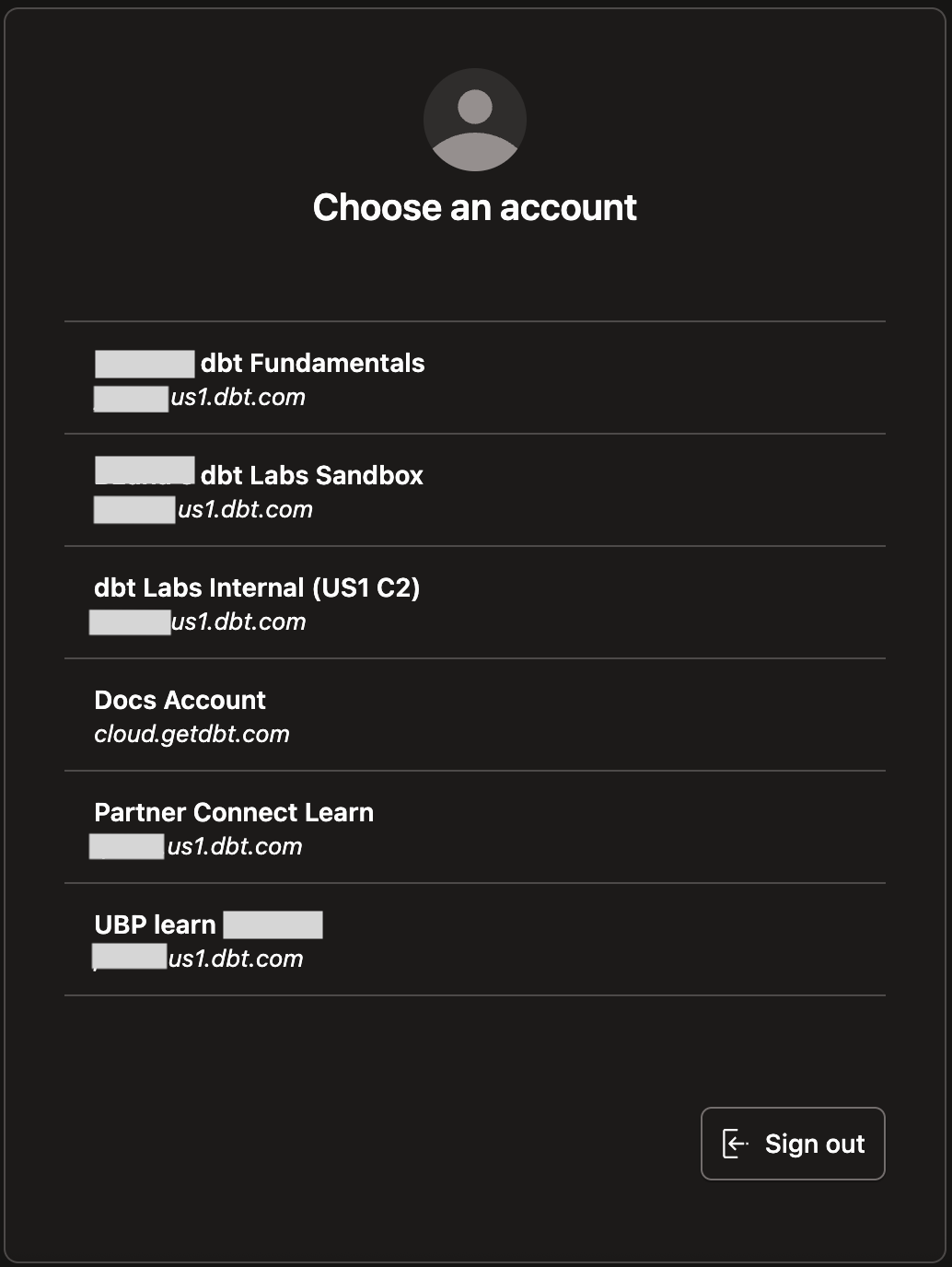 dbt accounts
- US multi-tenant:
ACCOUNT_PREFIX.us1.dbt.com(for example,abc123.us1.dbt.com) - EMEA multi-tenant:
ACCOUNT_PREFIX.eu1.dbt.com(for example,abc123.eu1.dbt.com) - APAC multi-tenant:
ACCOUNT_PREFIX.au1.dbt.com(for example,abc123.au1.dbt.com) - Worldwide single-tenant and VPC: Use the vanity URL provided during your onboarding.
Refer to the tables earlier for the full list of access URLs by region.
Locating your dbt IP addresses
There are two ways to view your dbt platform IP addresses:
- If no projects exist in the account, create a new project, and the IP addresses will be displayed during the Configure your environment steps.
- If you have an existing project, navigate to Account Settings and ensure you are in the Projects pane. Click on a project name, and the Project Settings window will open. Locate the Connection field and click on the name. Scroll down to the Settings, and the first text block lists your IP addresses.
Static IP addresses
dbt platform is hosted on AWS, Azure, and the Google Cloud Platform (GCP). While we can offer static URLs for access, we cannot provide a list of IP addresses to configure connections due to the nature of these cloud services.
-
Dynamic IP addresses — dbt platform provides static URLs for streamlined access, but the dynamic nature of cloud services means the underlying IP addresses can change occasionally. Cloud providers manage these IP ranges and may update them based on operational and security needs.
-
Using hostnames for consistent access — To ensure uninterrupted access, use dbt platform hostnames. Hostnames provide a consistent reference point, such as
abc123.us1.dbt.com, even if underlying IP addresses change. This aligns with an industry-standard practice used by platforms such as Snowflake. -
Optimizing VPN connections — You should integrate a proxy alongside VPN for users who leverage VPN connections. This strategy enables steady IP addresses for your connections, facilitating smooth traffic flow through the VPN and onward to dbt platform. By employing a proxy and a VPN, you can direct traffic through the VPN and then to dbt platform. It's crucial to set up the proxy if you need to integrate with additional services.
API Access URLs
For dbt platform accounts with cell-based account prefixes, account API access URLs are unique per account. You can find these URLs in Account settings, under Account information.
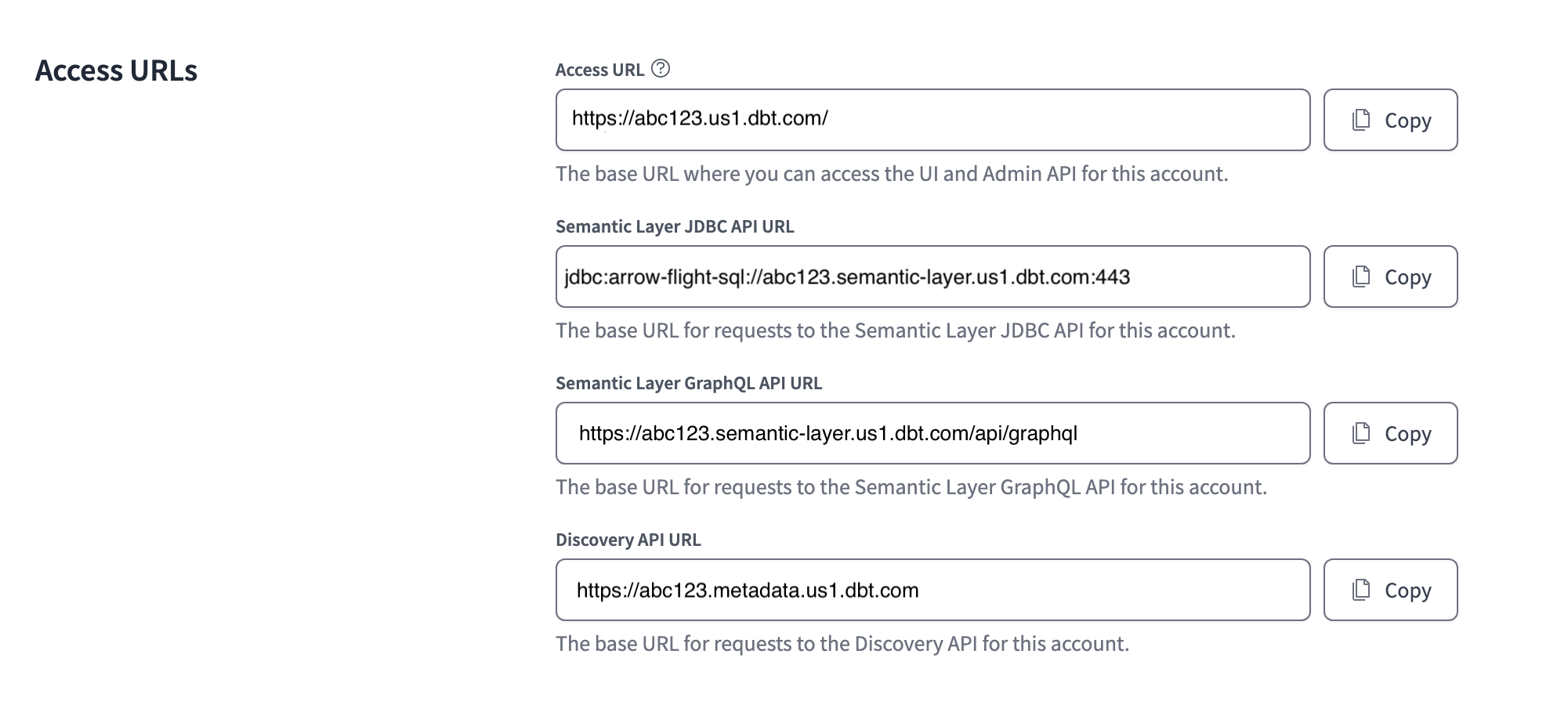 Access URLs in the account settings
These URLs are unique to each account and begin with the same prefix as the URL used to access your account. The URLs cover the following APIs:
- Admin API (via access URL)
- Semantic Layer JDBC API
- Semantic Layer GraphQL API
- Discovery API
Learn more about these features in our API documentation.
Was this page helpful?
This site is protected by reCAPTCHA and the Google Privacy Policy and Terms of Service apply.